

Accurate labour hour tracking is the process of recording exactly when workers start, stop, and switch tasks on a construction site. Without it, project budgets collapse quietly. Hours bleed into the wrong cost codes, payroll disputes arise, and managers lose visibility over where money is actually going. UK construction managers who master this process protect margins, satisfy clients, and build the kind of data that makes future estimates far more reliable. Tradewisehq is built around this exact need, combining mobile-first tools with live workforce syncing to keep labour data clean from the moment a worker sets foot on site.
How builders track labour hours on site
Builders track labour hours using three main approaches: paper timesheets, spreadsheets, and mobile apps. Each has a distinct place depending on site size, crew literacy, and the level of reporting detail required.
Paper timesheets remain common on smaller sites. Workers fill in start and finish times at the end of a shift, a foreman signs off, and the sheets go to the office for manual entry. The problem is obvious: memory fades, handwriting is misread, and data entry takes time that nobody has.

Spreadsheets improve on paper by centralising data, but they still depend on someone entering hours accurately and on time. A missed row or a formula error can distort an entire week's labour cost report.
Mobile apps are the most effective method for most UK builders today. Apps improve adoption rates because workers clock in or out with a single tap, unlike the longer data entry required by spreadsheets or paper. That simplicity is the key reason compliance improves when sites switch to app-based tracking.
Some larger sites use biometric time clocks, typically fingerprint or facial recognition terminals fixed at site entrances. These eliminate buddy punching entirely, where one worker clocks in for another. The trade-off is cost and infrastructure: biometric terminals need power, connectivity, and maintenance that smaller sites cannot always support.
The right method depends on your site. A sole trader managing two labourers needs a simple app. A principal contractor running a 40-person groundworks programme needs cost-coded digital records that feed directly into payroll.
- Paper timesheets: Low cost, no technology required, but prone to errors and delays.
- Spreadsheets: Centralised and flexible, but still manual and vulnerable to formula mistakes.
- Mobile apps: Fast, accurate, and the most widely adopted method for tracking construction time.
- Biometric terminals: Highly accurate and fraud-proof, but expensive and infrastructure-dependent.
- Mobile-friendly platforms: Allow workers to enter hours from phones or tablets anywhere, improving data timeliness.
How does GPS and geofencing improve tracking accuracy?
GPS verification and geofencing are the two technologies that close the biggest gap in construction time tracking: confirming that a worker was actually on site when they clocked in.
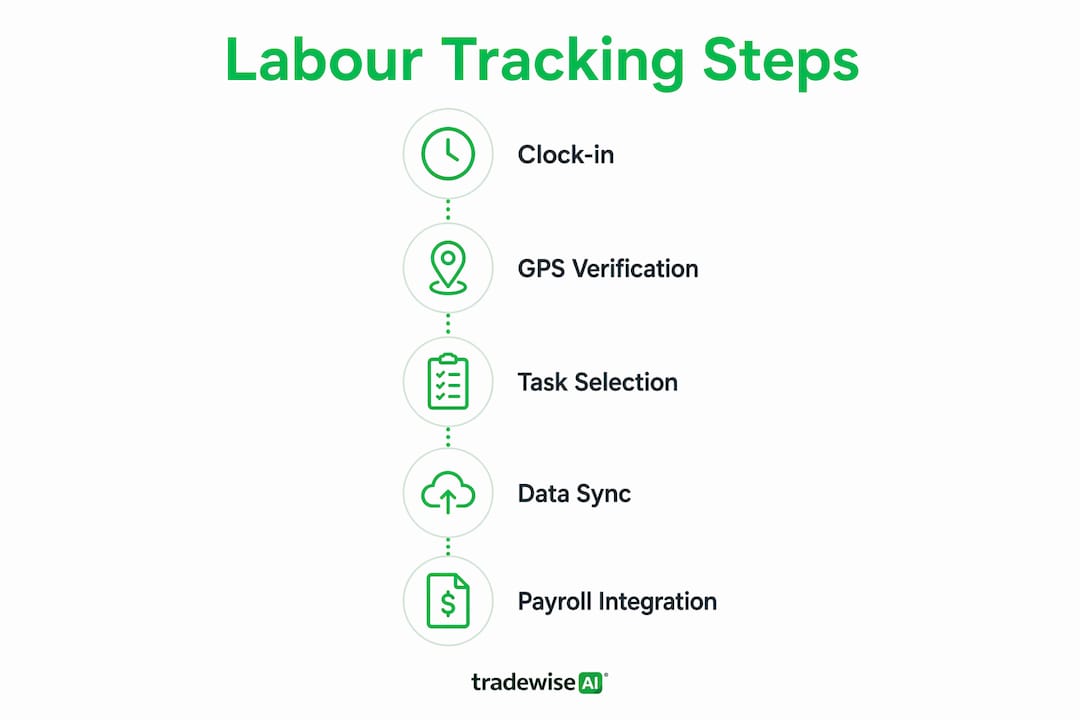
Geofencing works by drawing a virtual boundary around a job site using GPS coordinates. When a worker opens the time tracking app and taps to clock in, the system checks their location. If they are outside the boundary, the clock-in is blocked or flagged. Geofencing confirms workers clock in only when onsite, preventing fraudulent entries that inflate payroll costs.
This matters more than many managers realise. A worker who clocks in from a van parked 200 metres down the road, or from home the night before, creates a payroll entry that looks legitimate but is not. Multiply that across a crew of 15 over a six-month project and the cost is significant.
GPS tracking also creates a location audit trail. If a dispute arises over whether a worker was on site during a specific period, the GPS log provides objective evidence. That protects both the business and the worker.
For managers, the practical benefit shows up in payroll accuracy and project cost control. Hours recorded against the correct site, at the correct time, flow into cost reports without manual correction. That saves hours of administrative work every week.
Pro Tip: Set your geofence boundary slightly larger than the physical site perimeter. Workers often clock in from a car park or welfare cabin just outside the build zone. A boundary that is too tight creates false rejections and frustrates crews, which kills adoption.
Adoption is the real challenge with GPS-enabled tracking. Workers sometimes resist location monitoring, viewing it as surveillance. The most effective approach is transparency: explain exactly what data is collected, confirm it is used only for payroll and attendance, and show workers how it protects their pay record. Sites that communicate this clearly see far higher compliance than those that roll out GPS tracking without explanation.
For a deeper look at managing live attendance data across multiple sites, the UK manager's guide to live job tracking covers the operational detail.
How does integrating labour data with payroll and job costing work?
Connecting time tracking directly to payroll and accounting software is the step that turns raw hour logs into financial intelligence. Without integration, approved hours must be re-entered manually into payroll systems, which introduces errors and delays.
Integration with platforms like QuickBooks, Sage, or ADP eliminates re-entry entirely. Approved hours flow from the time tracking system into payroll automatically. Payroll runs faster, errors drop, and the finance team spends less time chasing corrections.
The more powerful benefit is job costing. When labour hours are coded by project phase or task at the point of clock-in, managers can see exactly how much labour each phase of a build is consuming in real time. Coding hours by job site and project phase at clock-in saves hours of guesswork later and sharpens the accuracy of cost reports.
Granular tracking by project, task, phase, and employee helps teams understand where labour costs are concentrated. That data feeds directly into future estimates, making them more accurate and reducing the risk of underpricing.
A practical integration workflow looks like this:
- Worker clocks in via mobile app, selecting the correct job and phase code.
- Hours are recorded in real time against the correct cost centre.
- Manager reviews and approves hours daily, using anomaly alerts to flag issues.
- Approved hours transfer automatically to payroll software for processing.
- Finance team receives clean, coded data for job cost reports and client billing.
| Stage | Action | Benefit |
|---|---|---|
| Clock-in | Worker selects job and phase code | Accurate cost allocation from the start |
| Daily review | Manager checks anomaly alerts | Early identification of errors or overruns |
| Approval | Manager approves or queries hours | Clean data enters payroll |
| Payroll transfer | Automatic sync to Sage, QuickBooks, or similar | No manual re-entry, fewer errors |
| Reporting | Labour costs visible by project and phase | Real-time budget monitoring |
For builders who want to align this process with broader financial controls, the job costing best practices guide covers the full picture.
What are the best practices for getting workers to log hours accurately?
Worker compliance is the weakest link in every time tracking system. The technology can be perfect, but if workers forget to clock in, select the wrong cost code, or log hours in batches at the end of the week, the data is unreliable.
Forgetfulness is the main adoption barrier. Reminders are the most effective fix until logging becomes habitual. Setting phone alarms five minutes before start times nudges workers to clock in consistently. This sounds trivial, but it works. Habit formation takes time, and a recurring alarm removes the cognitive load of remembering.
- Train workers to select cost codes at clock-in, not afterwards. Retrospective coding is guesswork. Workers cannot reliably remember which phase they worked on three days ago.
- Tie accurate logging to accurate pay. Workers who understand that their pay depends on their clock-in record have a direct personal incentive to log correctly.
- Use automated anomaly alerts. Daily anomaly alerts highlight potential errors, improving accuracy and saving managers from reviewing every timesheet manually.
- Use one tool for all jobs. Using one platform consistently avoids confusion and makes weekly hour reviews straightforward.
- Review daily, not weekly. Daily check-ins with automated alerts are more effective than weekly manual reviews for catching labour cost issues early.
Pro Tip: Run a five-minute briefing in the first week of any new tracking system. Show workers exactly how to clock in, select a cost code, and what happens if they miss a punch. Crews who understand the process from day one make far fewer errors than those who figure it out as they go.
The fairness argument is underused by most managers. Workers who trust that the system records their hours accurately are more likely to use it correctly. If a worker once lost pay because of a timesheet error, they will be sceptical of any new system. Showing them that the app creates a transparent, auditable record that protects their pay is the most persuasive case you can make.
Key takeaways
Accurate labour hour tracking requires combining the right method, GPS verification, and payroll integration to produce reliable, real-time cost data across every project phase.
| Point | Details |
|---|---|
| Choose the right method | Mobile apps deliver the highest compliance; paper timesheets suit only the smallest sites. |
| Use GPS and geofencing | Location verification prevents fraudulent clock-ins and creates an objective attendance record. |
| Integrate with payroll | Connecting time tracking to Sage or QuickBooks eliminates re-entry errors and speeds up payroll. |
| Code hours at clock-in | Workers should select the correct job and phase code when they clock in, not retrospectively. |
| Review daily with alerts | Automated anomaly alerts catch errors early and reduce the cost of labour overruns. |
What I have learned from watching UK builders adopt time tracking
The shift towards mobile-first, GPS-enabled labour tracking in UK construction is real, but it is slower than the technology warrants. I have seen sites spend months debating which app to use while continuing to run paper timesheets that nobody trusts. The delay always costs more than the decision.
The adoption barriers are rarely technical. Workers can use a mobile app. The real obstacles are managerial: no one explains the system clearly, cost codes are set up incorrectly, and managers do not review the data daily so errors compound. By the time someone notices a problem, three weeks of labour data needs correcting.
The sites that get this right share one habit: daily data reconciliation. A manager who spends ten minutes each morning reviewing flagged anomalies catches problems before they become budget crises. That discipline is more valuable than any feature in any app.
My honest advice is to resist the temptation to choose the most feature-rich platform available. Choose the one your crew will actually use. A simple app with GPS clock-in, cost code selection, and a daily alert to the manager will outperform a complex system that workers ignore. Complexity kills compliance. Simplicity builds it.
— Mateusz
Tradewisehq: built for builders who need accurate labour data
Tradewisehq is an AI-powered platform designed specifically for tradespeople and construction businesses that need to manage jobs, staff, and costs from a single mobile app.
For builders who want to move beyond paper timesheets and disconnected spreadsheets, Tradewisehq brings together job and workforce management in one place. Workers clock in via mobile, hours are coded to the correct job and phase automatically, and managers get real-time visibility over labour costs without chasing paperwork. The platform also handles scheduling, quotes, invoices, and client communication, so the whole operation runs from one tool rather than five. If accurate labour tracking is a priority for your business in 2026, Tradewisehq is worth a closer look.
FAQ
What is the most accurate way to log work hours on a construction site?
Mobile apps with GPS verification and geofencing are the most accurate method. They confirm worker location at clock-in and eliminate manual data entry errors.
How does geofencing prevent time theft in construction?
Geofencing blocks or flags clock-ins from workers who are outside the defined site boundary. This prevents workers from logging hours when they are not physically on site.
Should workers select cost codes when they clock in or afterwards?
Workers should select cost codes at clock-in. Retrospective coding relies on memory and produces inaccurate job cost data that distorts project budgets.
How often should managers review labour hour data?
Managers should review labour data daily using automated anomaly alerts. Daily review catches errors and overtime issues before they compound into significant cost overruns.
Can time tracking software connect directly to payroll systems like Sage?
Yes. Time tracking platforms that integrate with Sage, QuickBooks, or similar software transfer approved hours automatically, removing manual re-entry and reducing payroll errors.