

Dispatch scheduling is the combined process of planning who does which job when, then assigning and adjusting those jobs against real-world conditions as the day unfolds. The strongest approach for most trades and field-service operations is a constraint-aware, real-time scheduling workflow, one that runs on live workforce data and route optimisation rather than a static rota drawn up the night before. Get that right, and the rest of this guide fills in the detail: which features actually matter, how to roll a system out without disrupting live jobs, which KPIs prove it's working, and how to pick a vendor that won't box you in.
Key Takeaways
Dispatch scheduling works best as a constraint-aware, real-time process built on live workforce data and route optimisation, not a static rota adjusted by phone calls.
| Point | Details |
|---|---|
| Scheduling and dispatching are different | Scheduling plans capacity days ahead; dispatching assigns and adjusts jobs in real time. |
| Data quality beats software choice | Clean job, address, and skills data before go-live, or even the best routing engine produces bad plans. |
| Pilot before full rollout | Run a four to six week pilot and judge it on drive time, on-time arrival, and schedule edit rate. |
| Track a focused KPI set | On-time arrival, first-time fix, utilisation, and SLA breach rate reveal more than raw job counts. |
| TradeWise consolidates the stack | TradeWise combines scheduling, dispatch, invoicing, and route integration in one mobile-first platform for trades businesses. |
Table of Contents
- What is dispatch scheduling, and how does it differ from dispatching?
- Why does dispatch scheduling matter for your business?
- What features should dispatch scheduling software have?
- What does good dispatch scheduling practice actually look like?
- How should you roll out a new dispatch scheduling system?
- What KPIs actually measure dispatch performance?
- Which technologies actually improve dispatch outcomes?
- What does dispatch scheduling software cost?
- How do you choose the right dispatch scheduling solution?
- An operator's view on why dispatch scheduling gets underrated
- See how TradeWise handles dispatch scheduling in practice
- Frequently asked questions about dispatch scheduling
- Sources
What is dispatch scheduling, and how does it differ from dispatching?
Scheduling and dispatching get used interchangeably by people who've never had to do either under pressure, but they're two distinct jobs with different time horizons.
Scheduling is the planning layer. It's where you decide shift patterns, allocate technicians to time windows, and balance capacity against expected demand, usually hours or days ahead of the work happening. Dispatching is the execution layer. It's the real-time act of assigning a specific job to a specific person or vehicle right now, then re-assigning when a job overruns, a van breaks down, or an emergency callout jumps the queue. Scheduling asks "who's available this week?" Dispatching asks "who's five minutes from this address, right now, with the right parts on board?"
The confusion matters because businesses that only invest in scheduling tools (a decent rota builder, say) often find themselves still running dispatch by phone and WhatsApp, which defeats the purpose.
| Aspect | Scheduling | Dispatching |
|---|---|---|
| Speed of change | Hours to days | Seconds to minutes |
| Primary data inputs | Shift patterns, skills, availability | GPS location, live job status, traffic |
| Typical user | Operations manager, planner | Dispatcher, field supervisor |
| Time horizon | Days to weeks ahead | Real time, same day |
Both layers depend on the same core building blocks, and a system that handles one badly usually struggles with the other:
- Jobs — the work itself, with duration estimates and priority level.
- Resources — technicians, vehicles, tools, and parts needed to complete each job.
- Time windows — the slots customers or SLAs demand.
- Constraints — skills, certifications, vehicle capacity, driving-hour limits.
- SLAs — the service commitments that define what "on time" and "done right" actually mean for your business.
Why does dispatch scheduling matter for your business?
The commercial case for tightening up dispatch scheduling comes down to three things: fewer wasted hours, lower fuel and labour spend, and customers who stop chasing you for updates.

Efficiency gains show up first in drive time. Every unnecessary mile a technician drives between jobs is time they're not earning, and fuel and vehicle wear you're paying for regardless. Route optimisation tools that account for traffic, capacity, and driver hours consistently produce tighter, shorter routes than a dispatcher eyeballing a map, particularly once you're coordinating more than a handful of vehicles a day.
Efficiency and cost gains typically show up in three places:
- Reduced idle and drive time between jobs, freeing technicians for more billable work each day.
- Fewer emergency reshuffles, because constraint-aware scheduling catches conflicts before they become a 7am phone call.
- Lower admin overhead, since fewer manual edits mean less time spent on the phone confirming and re-confirming appointments.
- Better first-time fix rates, because the right technician with the right skills and parts turns up the first time, not the second.
Google's Routes platform, for instance, factors in predictive traffic drawn from historic time-of-day and day-of-week patterns, which is precisely the kind of input that turns a rough route guess into a realistic, traffic-aware plan. Feed a route optimisation engine accurate constraints, and it will typically find sequencing efficiencies a human dispatcher, working from memory and a whiteboard, simply won't spot at scale.
Pro Tip: Most managers underestimate how much friction comes from data quality, not software choice. If your job durations, addresses, or technician skills are wrong or outdated in the system, even the best route optimisation engine will produce bad plans. Clean your data before you go live, not after.
What features should dispatch scheduling software have?
Not every tool marketed as "dispatch scheduling software" actually dispatches. Some are glorified rotas with a map bolted on. Here's what to actually check for before you commit budget.
Core capabilities to look for:
- Real-time job status updates, so a technician marking a job complete instantly frees them for the next assignment.
- A mobile technician app, since field staff without a working, offline-capable app will fall back on phone calls the moment signal drops.
- Route optimisation that accounts for multiple stops and live traffic, not just straight-line distance.
- Constraint-based assignment that respects skills, certifications, and equipment needs automatically.
- Skills and certification matching, particularly for regulated trades work like gas or electrical.
- Time-window enforcement for customer appointment slots and SLA deadlines.
- Load and vehicle capacity limits, so a job requiring a full van isn't assigned to a technician already carrying stock for three others.
- Support for repeat and recurring bookings, useful for planned maintenance contracts.
- Calendar sync with existing tools, so office staff aren't managing two competing diaries.
- Alerts and notifications when a job risks breaching its SLA window.
Integrations worth checking during procurement:
- Route optimisation APIs, which handle the sequencing maths behind multi-stop days.
- Telematics or fleet-tracking feeds, giving dispatchers live vehicle location rather than a technician's best guess.
- CRM and ERP connectors, so job history and customer data don't live in two disconnected systems.
- Invoicing and payroll integration, closing the loop between a completed job and getting paid for it.
- Parts and inventory systems, particularly relevant for trades that stock-check before confirming a callout.
The features that matter most shift depending on the job type. An emergency callout operation lives or dies on real-time reassignment speed and accurate live location data. A planned maintenance business cares more about recurring booking logic and calendar sync. A multi-stop delivery operation needs strong route sequencing and vehicle capacity handling above almost everything else.
What does good dispatch scheduling practice actually look like?
The businesses that run dispatch well aren't necessarily using flashier software than everyone else. They've simply built consistent habits around how jobs get planned, confirmed, and adjusted.
- Prioritise SLA-critical jobs first. Build your schedule around the jobs with the tightest deadlines or contractual penalties, then fit flexible work around them, not the other way round.
- Protect time buffers. A schedule packed edge to edge looks efficient on paper and collapses the moment one job overruns. Leave breathing room between appointments.
- Batch nearby jobs together. Grouping jobs geographically cuts drive time more reliably than almost any other single change you can make to a schedule.
- Enforce skills and qualifications matching automatically. Don't rely on a dispatcher remembering which technician holds which certification. Let the system block mismatches before they happen.
- Confirm appointments proactively. A quick automated reminder the day before cuts no-shows and last-minute cancellations that throw the rest of the day out.
- Build re-optimisation rules for disruption. Decide in advance how the system should respond when a job overruns or a vehicle breaks down, rather than improvising every time it happens.
Pro Tip: Experienced dispatchers often keep one technician deliberately under-booked during peak hours as a shock absorber. It looks inefficient on a utilisation report and saves the day every time an emergency callout comes in.
A quick self-audit checklist for managers:
- Do you know your current on-time arrival rate without pulling a manual report?
- Can your dispatcher reassign a job in under two minutes when something goes wrong?
- Are skills and certifications enforced automatically, or does someone have to remember them?
- Do technicians get schedule updates on a phone, or do they find out by calling the office?
How should you roll out a new dispatch scheduling system?
Rushing a rollout is the single most common reason a good piece of software gets blamed for a bad outcome. A phased approach protects live operations while you learn how the tool actually behaves with your data.
The rollout typically runs through six stages:
- Requirements and data audit — map your current jobs, resources, and constraints, and clean up address, skills, and duration data before migration.
- Pilot design — pick one team, depot, or region small enough to monitor closely but representative enough to be a fair test.
- Integration — connect route optimisation, telematics, CRM, and invoicing systems before expanding beyond the pilot.
- Dispatcher and field training — train the people making live calls first, then the wider technician base.
- Change management — communicate why the change is happening and what's different for the people doing the work day to day.
- Go-live and monitoring — launch with close daily oversight for the first few weeks, watching for the specific failure points a pilot won't have caught.
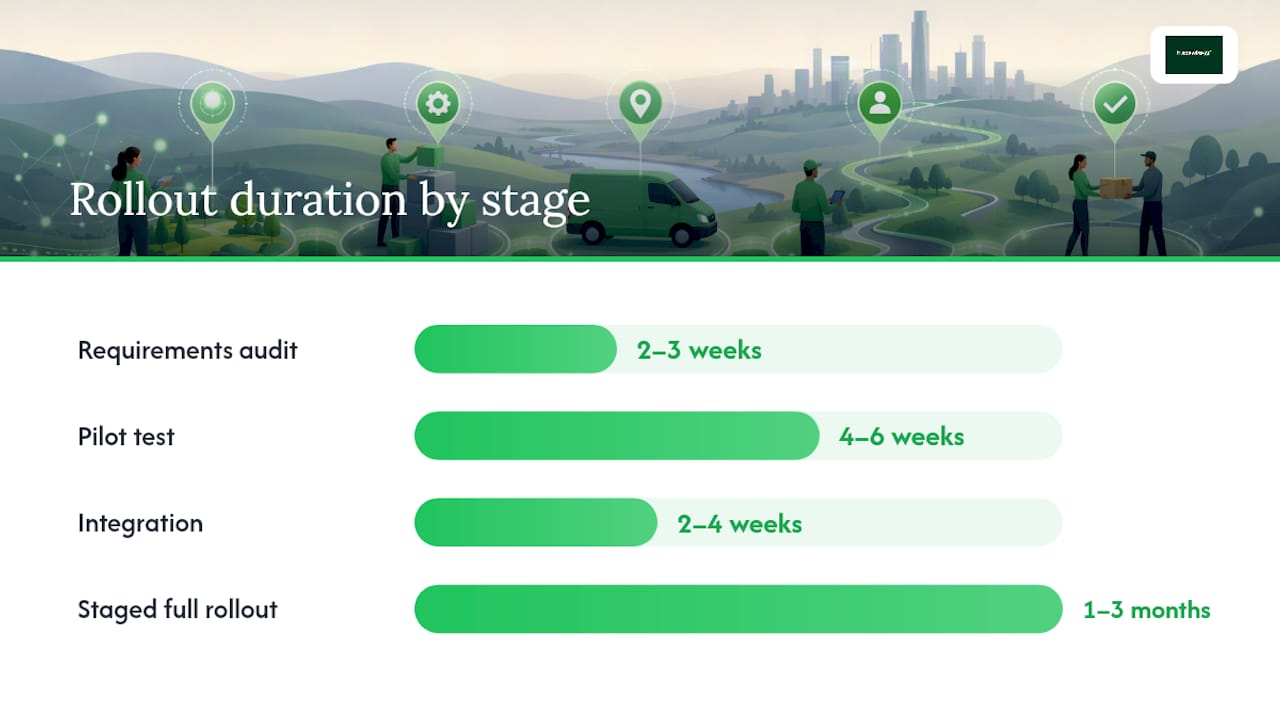
- Run the requirements audit and data cleanup in the first two to three weeks.
- Keep the pilot itself running for four to six weeks, long enough to cover a normal demand cycle without dragging on.
- Budget two to four weeks for integration work, depending on how many systems you're connecting.
- Plan a staged full rollout across the remaining teams over one to three months, rather than flipping every depot on the same day.
Pro Tip: Judge pilot success against three numbers you can actually measure cleanly: average drive time per stop, on-time arrival rate, and how often the schedule needed manual editing after it was published. If all three improve, or even hold steady while job volume rises, you've got a legitimate case to expand.
Businesses that skip the pilot and go straight to full rollout tend to discover their edge cases (the one client with a locked gate, the technician who only carries certain parts) the hard way, in front of customers, rather than during a controlled test.
What KPIs actually measure dispatch performance?
Vanity metrics like "number of jobs completed" tell you almost nothing about whether your dispatch scheduling is actually working. These seven do.
| Metric | Definition | How to measure | Reporting cadence |
|---|---|---|---|
| On-time arrival rate | Percentage of jobs where the technician arrived within the promised window | Compare scheduled vs. actual arrival timestamps | Weekly |
| First-time fix rate | Percentage of jobs resolved without a return visit | Track jobs requiring a second visit against total completed jobs | Weekly or monthly |
| Utilisation rate | Percentage of a technician's paid hours spent on billable work | Divide billable job hours by total scheduled hours | Monthly |
| Jobs per technician per day | Average completed jobs per technician per working day | Total completed jobs divided by technician days worked | Weekly |
| Average travel time per stop | Mean drive time between consecutive jobs | Sum drive time between stops divided by number of stops | Weekly |
| Schedule edit rate | How often a published schedule requires manual changes | Count manual reassignments divided by total scheduled jobs | Weekly |
| SLA breach rate | Percentage of jobs that missed a contracted service window | Count breached jobs divided by total SLA-bound jobs | Weekly or monthly |
A few practical notes on measuring these reliably: automate the timestamp capture wherever you can, since manually logged arrival times are notoriously optimistic. Sample a subset of jobs for a quality spot-check on first-time fix data rather than relying purely on technician self-reporting. And build one dashboard that surfaces on-time arrival, utilisation, and schedule edit rate together, because those three read as a set: a schedule with rising utilisation but a climbing edit rate is quietly falling apart even if the top-line numbers look fine.
Which technologies actually improve dispatch outcomes?
A handful of technical building blocks do most of the heavy lifting behind good dispatch scheduling, and it's worth understanding what each one actually contributes before you shortlist software built on them.
The core technology stack:
- Route optimisation APIs, which calculate optimal sequencing across single or multiple vehicles.
- Telematics and GNSS tracking, giving dispatchers live vehicle location rather than a technician's last check-in.
- Live ETA engines, updating customer-facing arrival estimates as conditions change through the day.
- Predictive and real-time traffic data, adjusting routes before congestion becomes a problem rather than after.
- CRM and ERP connectors, keeping job history, invoicing, and customer records synchronised across systems.
Google's Route Optimization API is a useful benchmark for what a modern engine should accept as input: time windows, vehicle capacity, and driver hours, with a response that returns a full stop sequence, assigned shipments, and overall performance metrics. When you're evaluating a vendor's routing engine, ask specifically which of those constraint types it actually supports, because plenty of "route optimisation" features on the market handle distance and little else.
For smaller operations or specific use cases:
- Calendar-based tools like Calendly handle appointment automation well for service businesses running simpler, single-technician booking flows, connecting up to six calendars with buffers and availability rules built in.
- Multi-stop planning tools such as MapQuest's route planner suit operations that need straightforward stop sequencing without the complexity of a full dispatch platform.
Pro Tip: If your fleet includes or is moving towards electric vehicles, don't bolt EV constraints onto a routing system as an afterthought. Battery range, charging windows, and charger availability change routing assumptions fundamentally. A route that's optimal for a diesel van carrying full fuel can be entirely wrong for an EV that needs a 40-minute charging stop mid-shift.
What does dispatch scheduling software cost?
Pricing models vary more than most buyers expect, and the sticker price rarely reflects the true cost of running the system day to day.
Common commercial models you'll encounter:
- Per-user or per-seat pricing, typically scaling with the number of dispatchers and technicians accessing the system.
- Per-vehicle pricing, more common in fleet-heavy operations tracking telematics alongside scheduling.
- Per-job or usage-based pricing, where cost scales with dispatch volume rather than headcount.
- Usage-based API costs, relevant when you're paying separately for route optimisation calls at volume.
- Tiered SaaS plans, bundling a feature set at each price point, typically the model most trades businesses will encounter.
Total cost of ownership rarely stops at the subscription fee. Three factors tend to drive the real number up or down:
- Integration complexity, since connecting telematics, CRM, and invoicing systems takes setup time that a simple standalone tool doesn't need.
- Training and change management, particularly for larger teams where dispatcher habits are deeply entrenched.
- Ongoing support quality, where a vendor's response time to a live operational issue matters more than most buyers realise until they need it.
Here's a rough sense of how payback works in practice. Say a ten-technician operation cuts average drive time by 20 minutes per technician per day through better route sequencing. That's over three hours of reclaimed billable time daily across the team. At a modest hourly rate, that alone often covers a mid-tier SaaS subscription within the first couple of months, before you've even counted the admin hours saved from fewer manual schedule edits.
How do you choose the right dispatch scheduling solution?
Choosing well means matching the product to your actual operational complexity, not the vendor with the flashiest demo.
Questions worth asking every vendor on your shortlist:
- Does the routing engine handle time windows, vehicle capacity, and driver hours, or just distance?
- How does the platform handle data ownership and export if you switch providers later?
- Is there a genuinely usable mobile app, including offline functionality for poor-signal areas?
- What's the actual support SLA, not the marketing page's claimed response time?
- Which systems does it integrate with out of the box, and what needs custom development?
- How does pricing scale as you add technicians or vehicles?
Red flags that should make you pause:
- A closed API with no documented way to export your own job and customer data.
- Rigid workflows that can't be adjusted to match how your business actually runs.
- A mobile app that clearly feels like an afterthought bolted onto a desktop product.
- Vague or tiered pricing that only becomes clear after a sales call.
Match the product category to your actual scale. A single-depot operation with a handful of technicians rarely needs enterprise orchestration built for national logistics networks; that complexity adds cost and training overhead without matching benefit. Mid-market platforms suit growing trades businesses juggling multiple teams and job types. Enterprise-grade orchestration, built for multi-carrier fleets processing huge volumes of daily variables, is genuinely necessary only once you're operating at that scale.
An operator's view on why dispatch scheduling gets underrated
Most guides on this topic treat dispatch scheduling as a technology problem: pick the right software, plug in the right integrations, done. That's backwards. The businesses that struggle most aren't usually running bad software. They're running a good tool on top of bad habits, and no amount of route optimisation fixes a dispatcher who's still confirming jobs by phone because nobody trusts the app.
What gets consistently underestimated is how much friction sits in the handoff between the office and the field. A schedule can be mathematically perfect and still fall apart if the technician finds out about a change ten minutes after arriving at the wrong address. TradeWise was built around that specific gap, keeping job assignments, live location, and technician communication in one mobile-first system rather than treating scheduling as an office-only function that gets relayed to the field after the fact.
The other pattern worth naming honestly: teams often adopt dispatch software to fix a symptom (missed appointments, angry customers) without fixing the underlying cause, which is usually inconsistent data. A technician's skills profile that's three years out of date, a job duration estimate nobody's revisited since the price list changed, an address that's never been corrected after a house renumbering. Software surfaces these problems faster than a manual system ever did. That's uncomfortable in month one and genuinely valuable by month three, because you finally know where your real operational gaps are instead of guessing.
See how TradeWise handles dispatch scheduling in practice
If you've been nodding along at the features checklist above, wondering how many separate tools you'd need to actually cover it, TradeWise was built to answer that question with one platform instead of five.
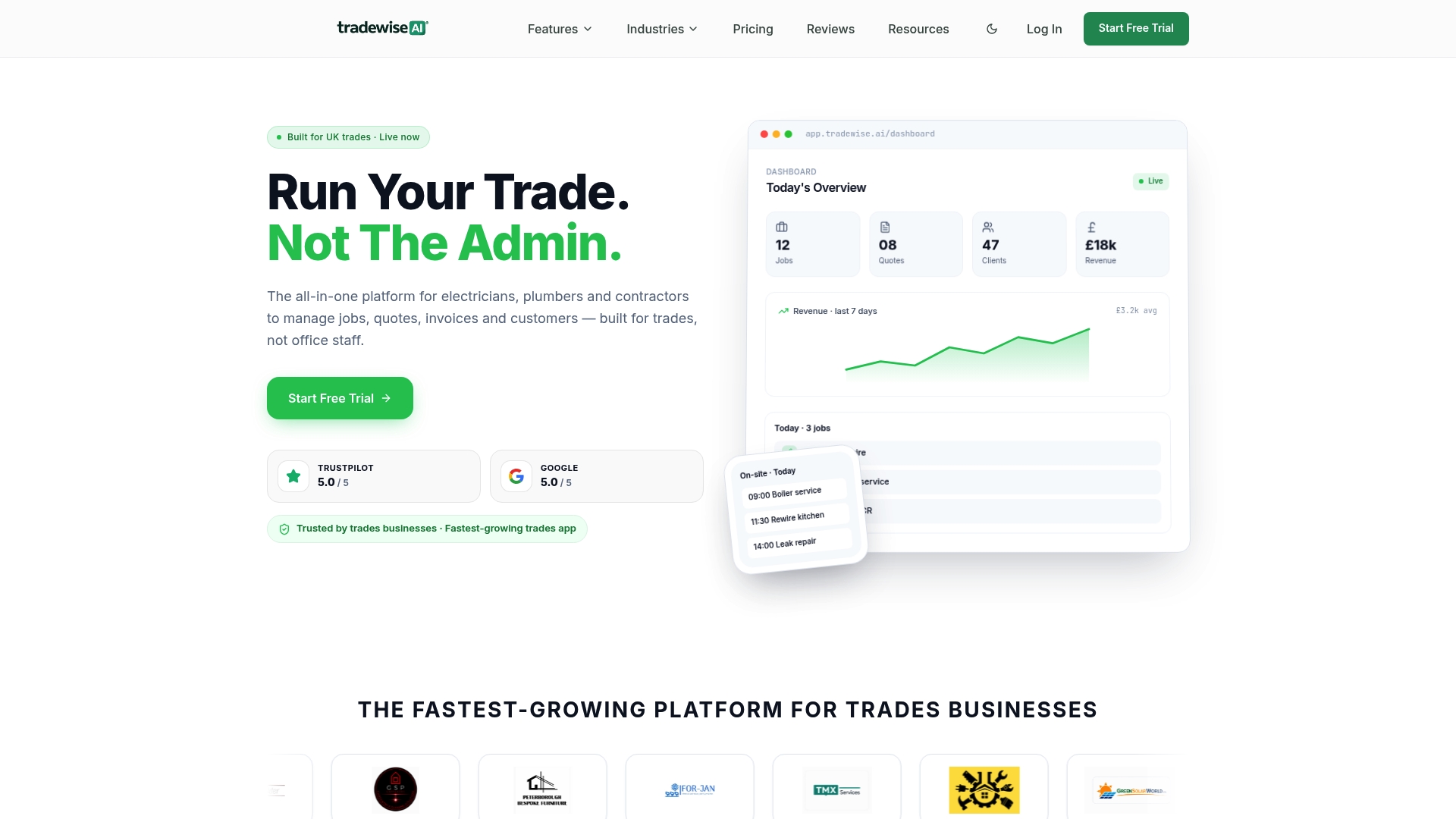
It's a mobile-first system built specifically for electricians, plumbers, builders, HVAC teams, and contractors, which means the dispatch and scheduling features aren't bolted onto a generic business tool. Job assignment, live workforce syncing, and route integration sit alongside quoting, invoicing, and client communication in one place, so a technician marking a job complete on their phone updates the schedule, the invoice, and the customer record simultaneously rather than needing three separate systems to talk to each other. AI-powered admin automation handles the repetitive scheduling edits that eat a dispatcher's day, and material price comparison means technicians aren't guessing about stock availability before they commit to a job window.
For an operations manager weighing up whether to build a stack from separate route optimisation, CRM, and invoicing tools or consolidate into one system, the practical case for consolidation is fewer integration points to break and one support line to call when something goes wrong. You can explore TradeWise's trade management platform and start a trial to see how job scheduling, dispatch, and invoicing behave together on a real day's workload before committing.
Frequently asked questions about dispatch scheduling
What's the difference between dispatch scheduling and just scheduling? Scheduling plans capacity and shifts ahead of time; dispatching assigns and adjusts specific jobs in real time as conditions change through the day.
How long does it take to implement dispatch scheduling software? A typical rollout runs a pilot for four to six weeks, followed by two to four weeks of integration work and a staged full rollout over one to three months.
What KPIs should I track first when adopting dispatch scheduling? Start with on-time arrival rate, first-time fix rate, and schedule edit rate. These three together reveal whether the system is genuinely improving reliability, not just shifting the same problems around.
Does dispatch scheduling software work for small trades businesses? Yes. Entry-level platforms and mobile-first tools scale down well for small teams, and the core benefits (fewer wasted miles, fewer missed appointments) apply just as much to a five-technician operation as a fifty-vehicle fleet.
How does route optimisation actually reduce costs? It sequences multi-stop routes to minimise drive time and account for constraints like vehicle capacity and driver hours, which cuts fuel spend and frees technician hours for billable work rather than travel.
What should I check before signing a dispatch scheduling contract? Ask about data export rights, mobile app offline functionality, actual support response times, and how pricing scales as your team grows, then watch for closed APIs or vague pricing as red flags.