

Yes, automating review requests is the fastest way for a small service business to collect regular feedback: set a trigger, send a one-tap SMS or short email, then follow up once if there's no response. That's the whole system. You don't need a marketing department or a complicated funnel — you need one clear moment that fires the request, and a link the customer can hit without thinking twice.
The workflow to build this week:
- Pick one trigger — job complete or invoice paid, not both yet.
- Send one message — SMS or email, with a one-tap link straight to your Google or Trustpilot profile.
- Follow up once — a single nudge three to five days later if there's no response, then stop.
Watch two numbers over the initial period: how many requests actually get delivered, and what proportion turn into a posted review. If delivery is solid but reviews aren't landing, the problem is the message, not the automation.
Key Takeaways
Automated review requests work best when one reliable trigger, a short one-tap message, and a single follow-up replace complex multi-step sequences that most small teams never finish building.
| Point | Details |
|---|---|
| Start with one trigger | Choose job complete or invoice paid, not both, and get it running reliably before adding a second. |
| Use one-tap links | Send customers straight to the review submission page, not a homepage they have to search through. |
| Cap follow-ups at one | A single resend three to five days later improves response without reading as pressure. |
| Handle consent properly | Track opt-outs and honour them across every future automated send under UK GDPR and PECR. |
| TradeWise centralises the workflow | TradeWise triggers review requests directly from job or invoice events within its trade management platform. |
Table of Contents
- What is review request automation and how does it work?
- How do you set up automated review requests step by step?
- Which trigger, timing and channel actually fits your business?
- Copy-ready templates and the fields that improve response rates
- Connecting your data: CRM, Zapier, or plain CSV uploads
- What metrics actually tell you the automation is working?
- How TradeWise runs this for trades businesses
- Getting consent and opt-outs right
- Choosing where to send customers: Google, Yelp, or Trustpilot
- Common mistakes that quietly break automated campaigns
- What successful review automation actually looks like in practice
- Handling negative reviews without panicking
- Do review requests actually help local search rankings?
- What the data actually tells small businesses to prioritise
- Getting this running without building it yourself
- Sources
What is review request automation and how does it work?
Review request automation removes the manual step of asking every customer for feedback. Instead of a technician remembering to text someone after a job, or an owner batching emails on a Friday afternoon, the system fires automatically the moment a defined event happens.
Four components make this work:
- Triggers — the event that starts everything: a job marked complete, an invoice marked paid, an appointment closed out. This is the single most important decision in the whole setup, because a badly chosen trigger sends requests at the wrong moment.
- Contact data — the customer's phone number or email, pulled from your CRM, invoicing tool, or a spreadsheet. No contact data, no automation, regardless of how good the message is.
- One-tap links — a direct link into a review platform's submission page rather than a generic homepage URL. Skipping this step is the most common reason automated campaigns underperform.
- Follow-up logic — rules for when to resend, how many times, and when to stop entirely.
Timing and personalisation both affect conversion more than most business owners expect. A request sent while the job is still fresh in the customer's mind, addressed by name, referencing the actual service, reads as genuine. A generic blast sent a fortnight later reads as spam, even when the sentiment behind it is identical.
How do you set up automated review requests step by step?
You don't need to build the whole system on day one. Start small, prove it works, then expand.
- Prepare your customer data. Export names, phone numbers or emails, and job types from wherever you currently store them, whether that's a CRM, invoicing software, or a shared spreadsheet. Flag anyone who's explicitly opted out of marketing contact.
- Choose one trigger to start. Invoice paid works well for trades with clear billing moments; job complete works better for service calls with no separate payment step. Pick whichever fires most consistently in your business.
- Write short templates. One SMS under 30 words, one backup email for customers without a mobile number on file. Draft a single follow-up message for non-responders.
- Configure the follow-up window. Three to five days after the initial send is a sensible default, with a hard cap of one resend.
- Test with 5 to 10 real customers before switching it on for everyone. Check that the link lands on the correct review page and that the message renders properly on mobile.
- Monitor for two weeks, then adjust timing or copy based on what the data shows.
Pro Tip: Run your test batch on customers you already have a good relationship with. If the automation breaks or the message reads oddly, you want that discovered by someone forgiving, not your newest and most uncertain client.
Once the first trigger is running cleanly, add a second one. Trying to launch multiple triggers simultaneously is the most common reason small teams abandon automation halfway through setup.
Which trigger, timing and channel actually fits your business?
The right setup depends entirely on how your business delivers its service, not on what a generic template recommends.
For one-off jobs — a boiler repair, a rewiring job, a single delivery — send the request within 24 hours of completion, while the experience is still vivid. For recurring services like cleaning contracts or maintenance plans, waiting until after two or three visits often produces a more considered review than asking after the first. Multi-channel approaches combining SMS and email routinely outperform single-channel outreach, though the right mix still depends on customer preference and what contact details you actually hold.
Some practical rules of thumb:
- Use SMS first when speed matters and you have verified mobile numbers, since open rates on text tend to beat email by a wide margin.
- Use email alone when the job involves higher-value, considered purchases where customers expect a more formal follow-up.
- Combine both for recurring service businesses where repeat contact is normal and won't feel intrusive.
Industry guidance on timing generally recommends sending the first request within 24 hours to seven days of the triggering event, with no more than one or two follow-ups spaced several days apart. Cap it there. Repeated pestering does more damage to your reputation than a missed review ever will.
Copy-ready templates and the fields that improve response rates
Short wins. A one-tap SMS template that works well in practice:
An equivalent email version can run slightly longer but should still lead with the link, not bury it in a paragraph. For customers who might be unhappy, route them somewhere private first:
This satisfaction-first structure protects your public rating while still capturing honest feedback from dissatisfied customers.
Dynamic fields worth using consistently:
- First name — always, never "valued customer."
- Service type — specific enough to jog memory ("boiler service," not "your recent job").
- Technician name — where relevant, adds a personal touch.
- Business name — especially if you operate under a trading name different from your legal one.
Keep the tone conversational, the message under 30 words for SMS, and the call to action singular. One link, one ask.
Connecting your data: CRM, Zapier, or plain CSV uploads
You don't need an enterprise CRM to run this. Three realistic paths exist, depending on what you already use.
If you have a CRM or invoicing tool with an API, Zapier or direct webhooks are the cleanest route. Zapier's documentation on review solicitation walks through triggering personalised requests the moment a job is marked fulfilled or an invoice is paid, connecting the event straight to your messaging tool without manual handling.
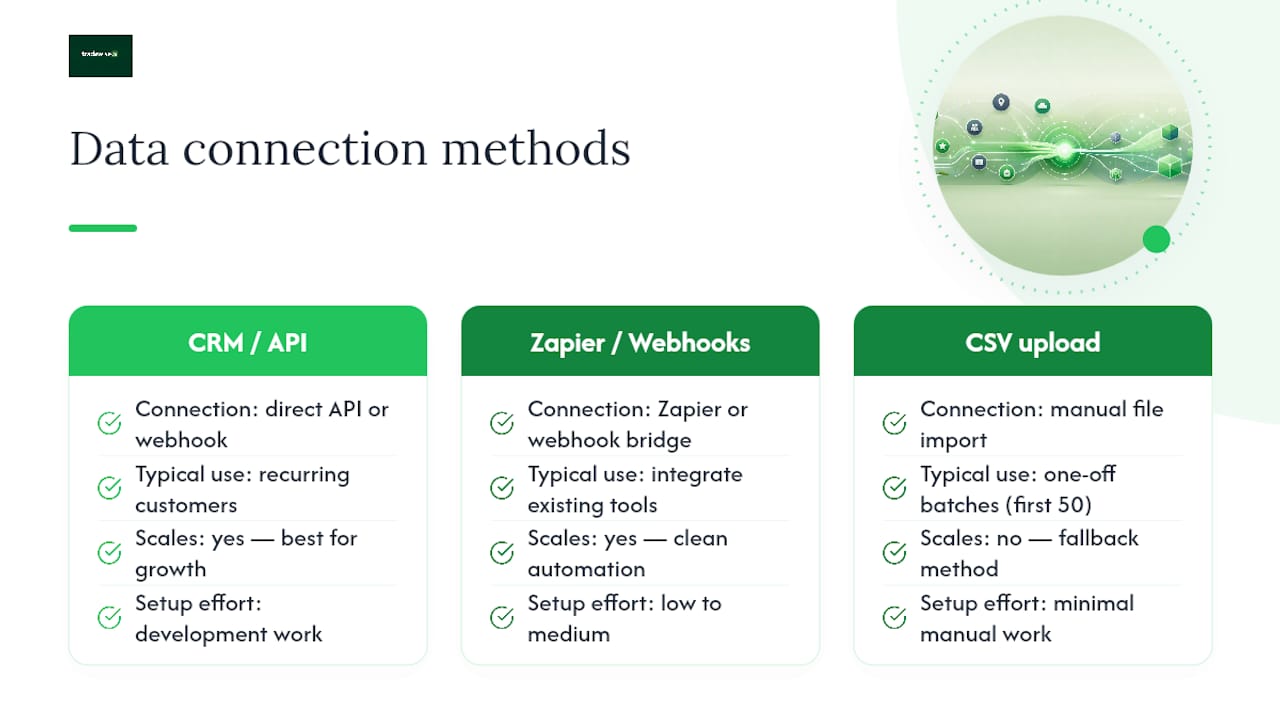
If your systems don't talk to each other, a genuinely low-tech option works surprisingly well: BCC a dedicated automation email address on every invoice you send. That single email address becomes the trigger, enrolling the customer into your review sequence without any integration work at all.
For businesses starting from scratch, CSV import is the fallback. Export a batch of recent customers, upload the list manually, and enrol them as a one-off group while you build the automated trigger properly. It's not elegant, but it gets your first 50 reviews moving while the real system is being built.
Whichever path you choose, CRM-triggered automation tends to scale better for businesses with recurring customers, while the CSV and BCC methods suit simpler invoicing setups just fine.
What metrics actually tell you the automation is working?
Four numbers matter, in this order: delivery rate, click-to-review rate, conversion to posted review, and the resulting change in your average star rating.
- Delivery rate tells you if your contact data is clean — anything below 90% suggests bad numbers or emails, not automation failure.
- Click-to-review rate measures whether your message and link actually get tapped.
- Conversion to review is the number that matters most: requests sent versus reviews posted.
- Average rating movement over 30 to 60 days shows whether the volume is helping your overall standing, not just adding noise.
Run a simple A/B test early: split your customer list, vary the send time (same day versus 24 hours later), and compare conversion. Small timing shifts often move the needle more than rewriting the copy entirely.
How TradeWise runs this for trades businesses
TradeWise centralises jobs, scheduling, invoices and client communication in one platform, which means the trigger and the message live in the same system rather than being stitched together across separate tools. A job gets marked complete, an invoice gets marked paid, and TradeWise can fire the review request from that exact event without a human remembering to send it.
Mapping the field engineer's sign-off timestamp directly to the trigger avoids the delay that kills response rates. The customer gets asked while the job is still fresh, not three days later when an admin gets round to it.
A typical trades workflow: job marked complete on-site, a one-tap SMS goes out within the hour, an email follow-up lands two days later if there's no response, and anyone flagging a problem gets routed to a private feedback form instead of a public review page.
Getting consent and opt-outs right
Automation makes it easy to send requests at scale, which also makes it easy to send them to people who never agreed to be contacted. Under UK GDPR and the Privacy and Electronic Communications Regulations, marketing-style messages generally require either consent or a legitimate interest basis, and a working opt-out mechanism is not optional.
In practice, this means a few concrete habits. Capture consent at the point you take a customer's details, whether that's a checkbox on a booking form or a line in your terms of service that customers agree to when they book a job. Keep a record of who has opted out, and make sure that flag is checked before every automated send, not just at setup.
Every message should carry a visible way to stop future contact, whether that's a "reply STOP" instruction on SMS or an unsubscribe link on email. If a customer opts out, that preference needs to persist across every future trigger, not just the current campaign.
One nuance that trips people up: a review request is arguably a different category of message from a marketing promotion, since it's tied to a service the customer already received rather than an attempt to sell something new. That distinction doesn't remove the need for consent and opt-out handling, though. Treat every automated message, review requests included, as subject to the same rules you'd apply to any customer communication, and you'll stay on the right side of both the law and your customers' patience.
Choosing where to send customers: Google, Yelp, or Trustpilot
Not every review platform deserves equal weight in your automation. Pick based on where your customers are actually searching, not on which platform is easiest to integrate.
For most local service businesses, Google Business Profile should be the default destination. It's the platform customers see first when searching for your business by name, and reviews there directly influence how you rank in local map results. If you only automate one platform to start, make it this one.
Trustpilot suits businesses with a stronger e-commerce or subscription element, where customers are used to leaving structured, detailed reviews. It carries less weight for a one-off boiler repair than it does for a recurring service contract.
Yelp matters more in some sectors and regions than others, and its review filtering algorithm can be unpredictable for newer profiles, so treat it as a secondary channel rather than your primary one unless your customer base is already active there.
Whichever platforms you choose, integrate them properly: use the direct review submission link, not the general business page, and test that link on both desktop and mobile before switching the automation on. A broken or slow-loading link at the final step undoes everything the trigger and message did correctly.
Common mistakes that quietly break automated campaigns
Most failed review automations aren't failing because the technology is broken. They're failing because of a handful of avoidable setup mistakes.
Sending too many follow-ups. One resend is usually enough. A third or fourth nudge reads as pressure, and customers who feel pressured are more likely to leave a negative review out of irritation than a positive one out of goodwill.
Using a generic link instead of a one-tap review link. A link that dumps the customer on your homepage, forcing them to hunt for the review button, kills conversion. The direct submission link matters more than almost any other variable in the whole system.
Ignoring opted-out customers. Sending automated messages to someone who's already unsubscribed doesn't just risk a compliance issue, it actively damages the relationship you're trying to protect.
Choosing the wrong trigger. Firing the request before the job is genuinely finished, or days after the customer has mentally moved on, both suppress response rates.
No monitoring after launch. Automations that run unattended for months tend to decay quietly, whether that's a broken link, a stale template referencing an old business name, or a trigger that's stopped firing because a tool integration changed. Check the pipeline monthly, not just at setup.
What successful review automation actually looks like in practice
A single clear trigger paired with a simple two-step sequence consistently outperforms elaborate multi-branch workflows, particularly for small teams without dedicated marketing support. The businesses getting the best results aren't running sophisticated funnels with five conditional branches. They're running one trigger, one message, one follow-up, done consistently across every job.
A local electrician running invoice-paid as the trigger, with a same-day SMS and a three-day follow-up, will typically outperform a business running a complex six-step email drip that nobody has time to maintain. The complexity doesn't add conversion, it adds maintenance burden, and maintenance burden is exactly what causes small businesses to abandon automation within a few months.
The pattern that works: pick the trigger that fires most reliably in your existing workflow, keep the message short and specific to the actual job done, and resist the urge to add more steps until the basic version has been running cleanly for at least a month. Businesses that add complexity too early tend to introduce more failure points than they add response rate.
Handling negative reviews without panicking
Automation will occasionally produce a negative review, and that's not necessarily a sign the system is broken. Routing dissatisfied customers to a private feedback form before they reach a public review page catches a meaningful share of unhappy experiences before they go public, giving you a chance to resolve the issue directly.

When a negative review does land publicly, respond promptly, acknowledge the specific issue rather than a generic apology, and avoid defensive language. Prospective customers reading reviews often pay as much attention to how a business responds to criticism as to the criticism itself. A calm, specific reply to a one-star review can do more for your reputation than ten additional five-star reviews sitting alongside it.
Don't attempt to suppress or dispute reviews that are factually accurate, even unflattering ones. Focus that energy instead on tightening the private feedback route in your automation, since a well-designed pre-screening step reduces how often negative sentiment reaches a public platform in the first place.
Do review requests actually help local search rankings?
Review volume and recency are among the signals that influence local search visibility, particularly on Google Business Profile, where consistent fresh reviews correlate with stronger placement in local map results. Automating requests keeps that flow steady rather than relying on the occasional customer who remembers to leave feedback unprompted.
The mechanism is straightforward: a business with reviews trickling in weekly signals ongoing activity and customer engagement, whereas a profile with a burst of reviews two years ago and silence since looks stagnant by comparison. Automated review request systems that fire consistently after every job tend to produce that steady drip far more reliably than manual asking ever does, simply because the request goes out every time rather than only when someone remembers.
This isn't a guarantee of higher rankings on its own, since local search algorithms weigh many factors together. But consistent review volume, combined with the reputation-protection routing covered earlier, gives a small business one of the more controllable levers available to it in local search, particularly compared with harder-to-influence factors like backlink profiles or domain age.
What the data actually tells small businesses to prioritise
The conventional advice on review automation tends to overcomplicate things. Guides push multi-step sequences, conditional branching by customer segment, and elaborate scoring systems before a business has even confirmed its basic trigger fires reliably. That's backwards. A single clear trigger with a two-step sequence beats a sophisticated workflow that nobody maintains, and the businesses seeing genuine review growth are almost always running something closer to the simple version.
What's underrated is timing discipline. Most owners focus energy on writing the perfect message and barely think about when it fires. But a mediocre message sent within an hour of job completion will usually outperform a beautifully crafted one sent three days later, because the immediacy is doing more work than the copy.
What I'd prioritise first: get one trigger working end to end, including the follow-up suppression and the opt-out handling, before touching a second channel or a fancier template. Compliance and reliability aren't the exciting parts of this system, but they're what determines whether it survives past month two. Everything else, including construction client communication practices and channel mix, is worth refining only once that foundation holds.
— Mateusz
Getting this running without building it yourself
Tradewisehq gives trades businesses the trigger and the message in one place, so you're not stitching together an invoicing tool, a CRM, and a separate automation platform to get a review request out the door. Job marked complete or invoice marked paid fires the request automatically, with the one-tap link, the follow-up window, and the opt-out handling already built into the workflow rather than something you configure from scratch.
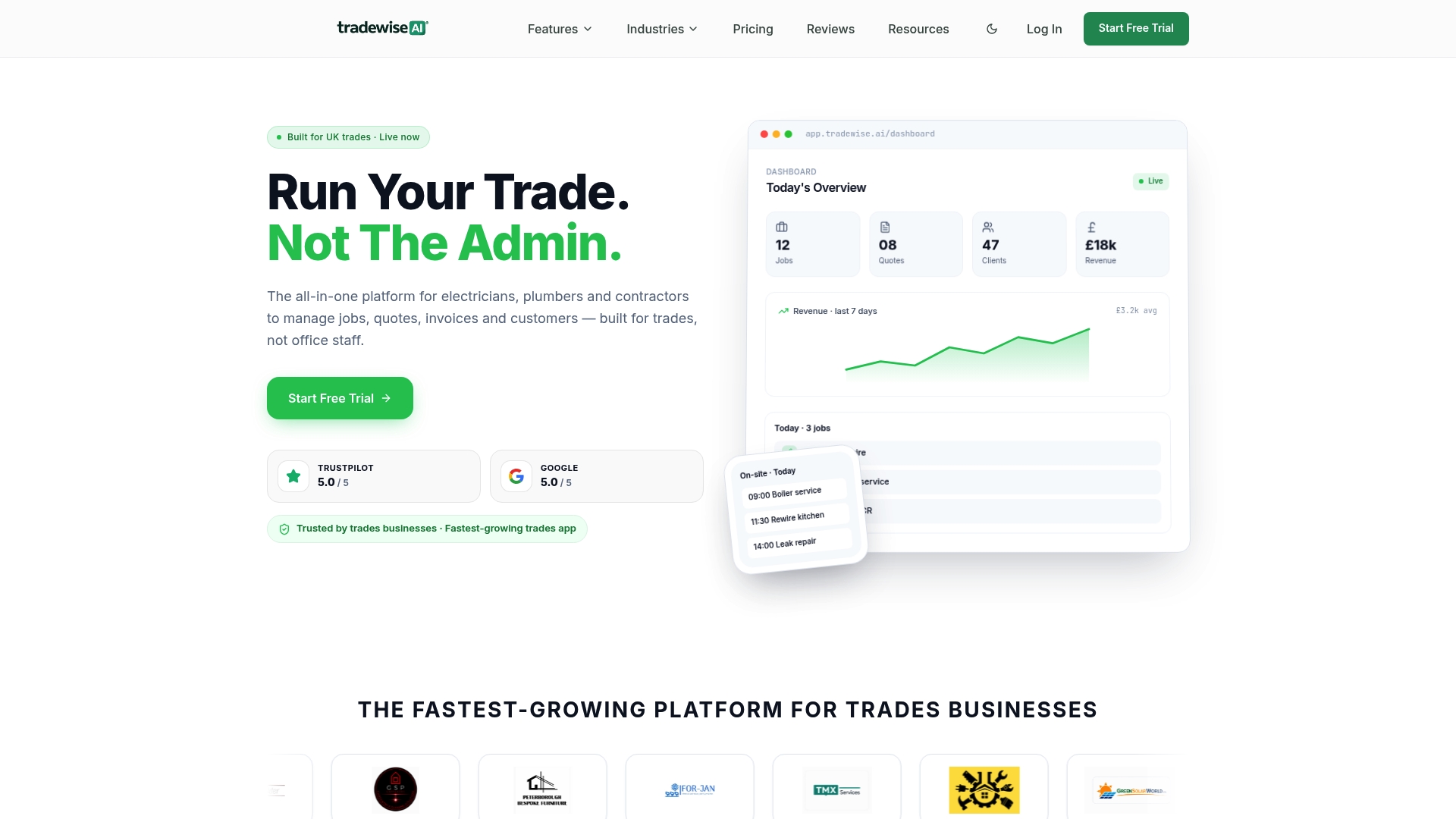
For a business running a service call checklist across multiple jobs a week, that means no manual step for anyone to forget and no separate tool to maintain outside the platform already running your scheduling and invoicing. If you're currently relying on someone remembering to send a text after every job, that's the exact gap this closes.
Start a trial on the TradeWise platform and connect your first job-complete trigger this week. You'll see delivery and click-through data within days, not months.