
If you searched "get jobber" hoping to find field-service software for your UK trades business, the short answer is this: Tradewisehq is the recommended platform for UK electricians, plumbers, builders, HVAC teams and contractors who want a mobile-first, AI-assisted system that handles everything from quote to paid invoice.
Worth noting before you go further: "jobber" means different things depending on where you look. FuelCloud uses it for fuel-delivery partners, and Jobbers Automotive has used the term since 1949 for automotive procurement. If you are a UK tradesperson looking for job management software, you are in the right place.
Three steps to get started with Tradewisehq right now:
- Go to Tradewisehq and click "Start Free Trial"
- Enter your business name, trade type, and email address
- Complete the 14-day free trial with no card required upfront
Key takeaways
UK trades businesses searching for field-service software should start a free trial, test the core daily workflows, confirm GDPR compliance, and make a decision based on what actually saves time in the field.
| Point | Details |
|---|---|
| Start with a free trial | Tradewisehq offers a 14-day free trial with full feature access and no card required upfront. |
| Test the workflows that matter | Prioritise quoting, scheduling, and payment collection during the trial — these deliver the fastest ROI. |
| Confirm GDPR compliance | Request a signed Data Processing Agreement before your trial converts to a paid subscription. |
| Check mobile reliability | Test offline mode, photo uploads, and quick quoting on your actual device before committing. |
| Tradewisehq for UK trades | Tradewisehq is the recommended mobile-first, AI-assisted platform for UK electricians, plumbers, builders, and contractors. |
Table of Contents
- What does field-service software actually do for your business?
- Which features must UK trades businesses check before signing up?
- How to get started with Tradewisehq as a UK trades business
- What should you expect from pricing and free trials?
- Does the mobile app work reliably for field teams?
- Is Tradewisehq GDPR-compliant and safe for UK customer data?
- How does Tradewisehq compare with other UK-ready alternatives?
- Why TradeWise is the right call for small UK trade teams
- Tradewisehq: start your 14-day free trial today
- Sources
What does field-service software actually do for your business?
Field-service software, sometimes called job management software, connects every part of a trade job in one system: quoting, scheduling, job tracking, invoicing, payments, and client communication. Without it, those tasks live across WhatsApp threads, paper pads, and spreadsheets that never quite agree with each other.
A practical example: a landscaper receives an enquiry on Monday, sends a quote from the app within minutes, books the job into the schedule, dispatches the crew with GPS routing, and emails the invoice the moment the job is marked complete. Payment lands in the bank the same day. No chasing, no re-keying data.
The core modules a trades business will use daily:
- Quoting and estimates with line-item pricing and digital acceptance
- Job scheduling and dispatch with calendar views and crew assignment
- Invoicing and payment collection including card-on-site and online payment links
- Client records and communication with automated reminders and job updates
- Materials tracking and supplier ordering to control job costs
- Reporting and accounting integration for VAT returns and profit visibility
Tradewisehq covers all of these in a single mobile-first platform built specifically for UK tradespeople, with AI tools that automate the admin that usually eats into evenings.
Which features must UK trades businesses check before signing up?
Not every platform delivers equally on every module. Before committing to any subscription, run through these feature categories and test each one during your trial.
| Feature category | What to check | Why it matters for UK trades |
|---|---|---|
| Quoting and estimates | Customisable line items, VAT calculation, digital sign-off | Speeds up job approval and reduces disputes |
| Scheduling and dispatch | Drag-and-drop calendar, GPS routing, real-time crew updates | Cuts wasted drive time and double-bookings |
| Invoicing and payments | Automated invoice generation, card reader support, payment links | Gets you paid faster, on-site or remotely |
| Client communication | Automated SMS/email reminders, job status updates | Reduces inbound calls and no-shows |
| Materials and stock | Supplier price comparison, purchase orders, job cost tracking | Protects margins on materials |
| Workforce sync | Live job status, staff time tracking, photo attachments | Keeps the office and field aligned |
| Accounting integration | Xero, QuickBooks or Sage compatibility | Simplifies VAT returns and bookkeeping |
| Mobile usability | Offline mode, iOS and Android, fast load on 4G | Field teams need it to work without Wi-Fi |
Pro Tip: The two features that deliver the fastest ROI for small UK trades teams are automated invoicing and scheduling. If you can send an invoice from your phone the moment a job is done and book the next job without a phone call, you have already recovered the subscription cost many times over. Test both on day one of your trial.
During a demo, ask specifically: does the system work offline? Can I take a card payment on-site? Does it connect to my accounting software? Those three questions separate genuinely useful platforms from ones that look good in a browser but frustrate field teams.
How to get started with Tradewisehq as a UK trades business
Getting set up takes less time than most trades owners expect. Have the following ready before you open the signup page: your business name and registered address, your VAT number if you are VAT-registered, and your bank details if you plan to activate payment collection from day one.
Step-by-step onboarding:
- Create your account at tradewisehq.com and select your trade type (electrician, plumber, builder, HVAC, contractor)
- Set up your services and pricing, including VAT rates where applicable
- Import your existing client list via CSV or add clients manually
- Build your first quote and send it to a real client for digital approval
- Book the accepted job into the schedule and assign it to a team member
- Mark the job complete, generate the invoice automatically, and collect payment
What to expect in your first week: most small teams have their first live quote sent within two hours of signing up. By day three, scheduling and job tracking are typically running. By the end of week one, the first automated invoice has usually gone out.
First 30-day checklist:
- Connect your accounting software (Xero, QuickBooks, or Sage)
- Set up automated client reminders for upcoming jobs
- Configure your materials list and supplier preferences
- Run your first month-end report and reconcile with your accountant
- Review the AI admin suggestions and activate the ones that save you time
For teams managing multiple sites, the guide on managing a construction site remotely covers how to keep oversight without being on-site every day.
What should you expect from pricing and free trials?
Most field-service platforms, including Tradewisehq, use a tiered subscription model: Starter, Pro, Business, and Enterprise. The price you pay depends on three main levers: the number of users on your account, the feature tier you choose, and whether you pay monthly or annually (annual plans typically cost less per month).
Payment processing fees are a separate line item on most platforms. Card transactions usually carry a percentage fee per transaction, so factor that in if you plan to take a high volume of card payments on-site.
Tradewisehq offers a 14-day free trial. Use that time to test the features that matter most to your daily workflow, not just the ones that look impressive in a demo.
Questions to ask before you commit:
- What is the per-user cost at my team size?
- Are there setup or onboarding fees?
- What is the payment processing rate for card transactions?
- Can I export my data if I leave?
- Is there a minimum contract length, or is it rolling monthly?
- Confirm the trial includes full feature access, not a limited preview
- Test scheduling, invoicing, and payment collection before the trial ends
- Ask for a written quote that includes all fees, not just the headline subscription price
Does the mobile app work reliably for field teams?
A field-service platform is only as good as its mobile app. For UK trades teams working across sites with patchy signal, offline capability is non-negotiable. Android developer documentation outlines the technical expectations for offline mode, permissions, and push notifications that any serious field-service app should meet.
Key mobile features to confirm during your trial:
- Offline mode: can you view jobs, add notes, and take photos without a signal?
- GPS dispatch: does the app show live crew locations and suggest routing?
- Time tracking: can field staff clock in and out from the app?
- Photo attachments: can you attach before-and-after photos to a job record?
- Quick quoting: can you build and send a quote from your phone in under two minutes?
For app ratings, check Google Play's rating system before installing. You can also report any issues or check data-safety disclosures directly through the Play Store listing. The data-safety section in a Play Store listing tells you what data the app collects and whether it is shared with third parties.
Tradewisehq is built mobile-first, meaning the app is the primary interface, not an afterthought bolted onto a desktop system.
Is Tradewisehq GDPR-compliant and safe for UK customer data?
UK trades businesses handle personal data every time they store a client's name, address, or contact details. Under UK GDPR, you are the data controller, and your software provider is the data processor. That distinction matters.
Before signing up to any platform, confirm:
- Hosting location: where is your data stored? EU or UK-based hosting is preferable for UK GDPR compliance
- Encryption: is data encrypted at rest and in transit?
- Backups: how often are backups taken, and how quickly can data be restored?
- Access controls: can you set role-based permissions so staff only see what they need?
- Audit logs: does the system log who accessed or changed a record?
To find and request a DPA: look in the platform's privacy or legal section, or email the support team directly. The DPA should specify the lawful basis for processing, data retention periods, your right to export or delete data, and the sub-processors the platform uses. For general guidance on what app providers should disclose, Google's privacy policy sets a useful benchmark for what transparency looks like.
Practical steps to reduce data risk from day one:
- Set user permissions so field staff cannot access billing or client financial records
- Confirm the data retention policy and set a calendar reminder to review it annually
- Request the DPA in writing before your trial converts to a paid subscription
How does Tradewisehq compare with other UK-ready alternatives?
The field-service software market for UK trades has grown considerably. Platforms vary significantly in their approach, pricing, and fit for small teams.
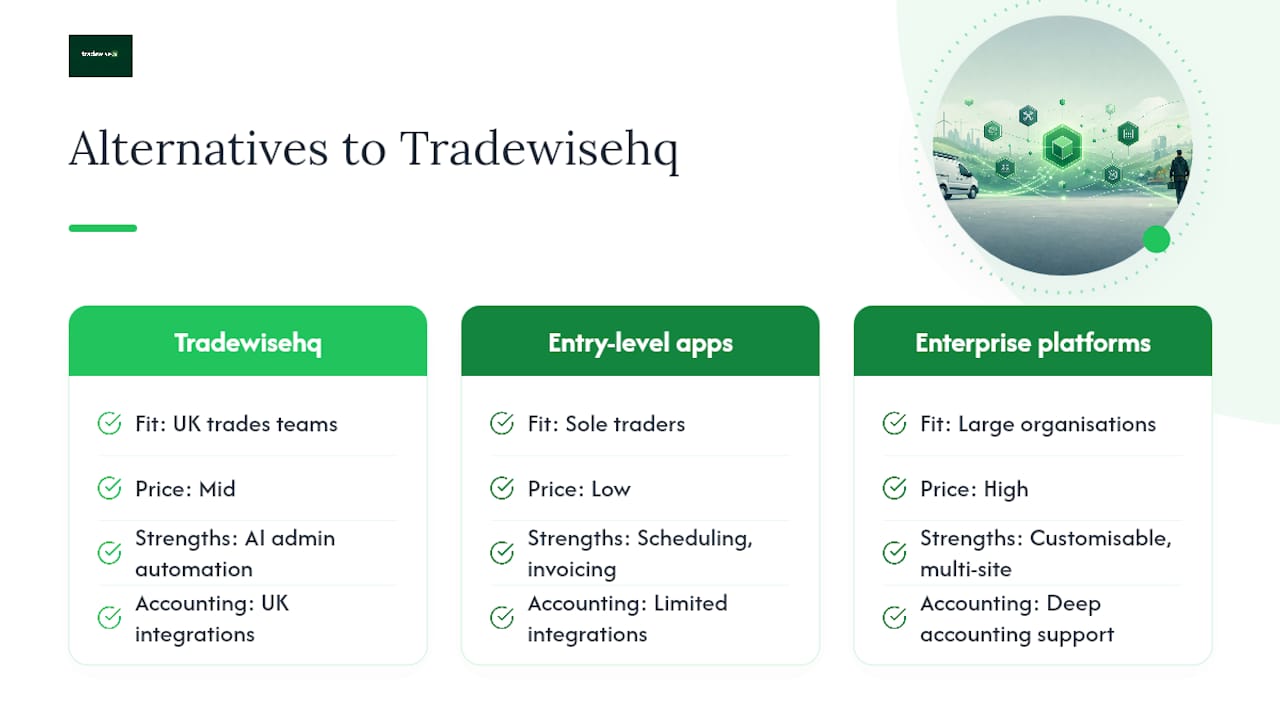
Tradewisehq is built specifically for UK tradespeople, with AI-powered admin automation, a mobile-first design, and integrations with UK accounting tools. It suits electricians, plumbers, builders, HVAC teams, and contractors who want one system to replace multiple disconnected tools. The comparison of GetJobber alternatives on the Tradewisehq blog covers how the category has developed and where different platforms sit.
Entry-level field apps typically offer scheduling and basic invoicing at a lower price point, but they often lack AI automation, materials management, and deep accounting integrations. They suit sole traders who need simple job tracking and nothing more.
Enterprise platforms offer extensive customisation and multi-site management, but they carry higher costs, longer implementation times, and support models built for larger organisations. A two-person plumbing firm does not need a six-month onboarding project.
Commission-based marketplaces work differently again. Jobbers, for instance, operates a commission-free model where professionals keep all earnings and payments are arranged directly between client and professional. That suits freelancers looking for leads, not businesses managing an existing client base and workforce.
For teams comparing quoting-focused tools, the quantumquote.co.uk alternatives guide and the askforeman.co.uk alternatives post are worth reading alongside this article.
Why TradeWise is the right call for small UK trade teams
The conventional wisdom in this category is that you should pick the platform with the most integrations or the biggest user base. That logic works for large enterprises. For a two-person plumbing firm in Leeds or a four-van electrical contractor in Bristol, it usually leads to paying for complexity you will never use.
What actually moves the needle for small UK trade teams is speed: how fast can you quote, schedule, invoice, and get paid? A system that shaves 40 minutes of admin off each working day is worth far more than one with 200 integrations you will never configure.
Tradewisehq is built around that reality. The AI admin tools handle the repetitive work — reminders, follow-ups, invoice chasing — so the business owner is not doing it at 9 PM. For a small team, that is the difference between growth and burnout, not a feature comparison table.
Support matters too. UK trades businesses need help during UK working hours, not a ticket queue that responds from a different time zone.
Tradewisehq: start your 14-day free trial today
Tradewisehq gives UK trades businesses a single platform to replace the quote spreadsheet, the WhatsApp scheduling thread, and the paper invoice book, all at once.
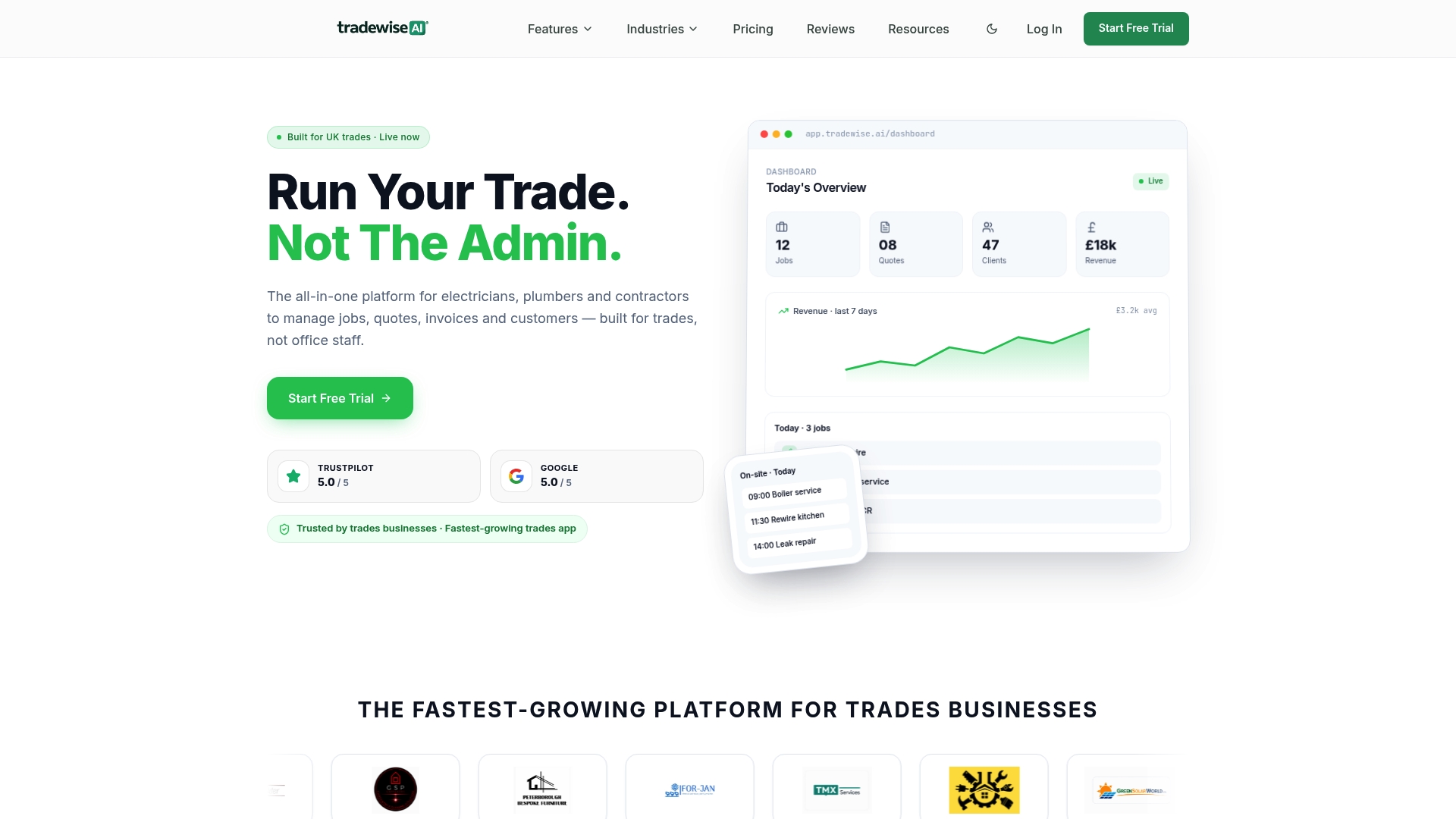
The 14-day free trial includes full access to scheduling, quoting, invoicing, payment collection, and AI admin tools. No card required to start. During the trial, focus on three things: send one real quote, book one real job, and collect one real payment. If those three tasks feel faster and easier than your current process, the platform is earning its keep.
To book a live demo or speak with the UK support team, visit Tradewisehq. Onboarding help is available for new accounts, and the team can walk you through connecting your accounting software on the first call.
Sources
- Privacy policy — Google policies
- Google Play help - app and game ratings
- Android developer documentation
- Freelance websites without commission | Remote jobs platform - Jobbers
- Find a Jobber | FuelCloud